- 04 Δεκ 2016, 21:28
#334757
Chris, ευχαριστώ αλλά δε με βλέπω να κάνω τέτοια δουλειά. Πιστεύω ότι δεν έχω χάσει κάτι από data, αλλά θα επικοινωνήσω και με τον server που κάνω upload να δω αν είχε ολοκληρώσει το backup τη μέρα που τα έφτυσε ο δίσκος, καθώς και πώς μπορώ να τα ανακτήσω από το cloud. Και μετά βλέπουμε.
Εντωμεταξύ, η απάντηση από Seagate, όταν τους έστειλα κάποια screenshots και τους περιέγραψα το πρόβλημα:
Dear Scotch,
Thank you for your response.
I have reviewed your screenshots and noticed that drive letter and File Format of the partitions are missing. In this case, formatting the drive is the only option to get your drive back. Hence, I request you to follow the below listed steps to format your hard drive.
As an advisory statement please understand that deleting, erasing, formatting, or partitioning your drive will permanently destroy your important data (pictures, videos, music, and documents), which Seagate cannot attempt to recover without cost to you.
Please follow the below procedure to perform diskpart:
1. Open command prompt (Press “Win + X”, and click on Command Prompt).
2. Type the command DISKPART press enter.
3. Diskpart will open the new window in that type the command SELECT DISK 1(if your drive is disk 1) press enter.
4. Type the command CLEAN and press enter.
5. After that initialize the disk in disk management.
6. Format the hard disk in disk management.
Please follow the below procedure to initialize the disk.
1. Go to Disk Management (Press “Win + X”, and click on Disk Management) --> right click disk 1.
2. Select initialize option from the popup.
3. Select GPT as a partition table.
4. After initializing is completed --> right click un-allocated space.
5. Select --> create a new volume from the popup and format.
6. Then check the capacity of the drive again.
Please reply to this email if you require further assistance.
Best regards,
Balamanikandan
Seagate Support
Για τα δεδομένα, κουβέντα.
< >






 ). Η θήκη όμως γιατί να φταίει; Τώρα είναι με firewire συνδεδεμένος στον iMac (που τρέχει w10). Και με usb που δοκίμασα, σε laptop με w7, πάλι unrecognized device μου βγάζει.


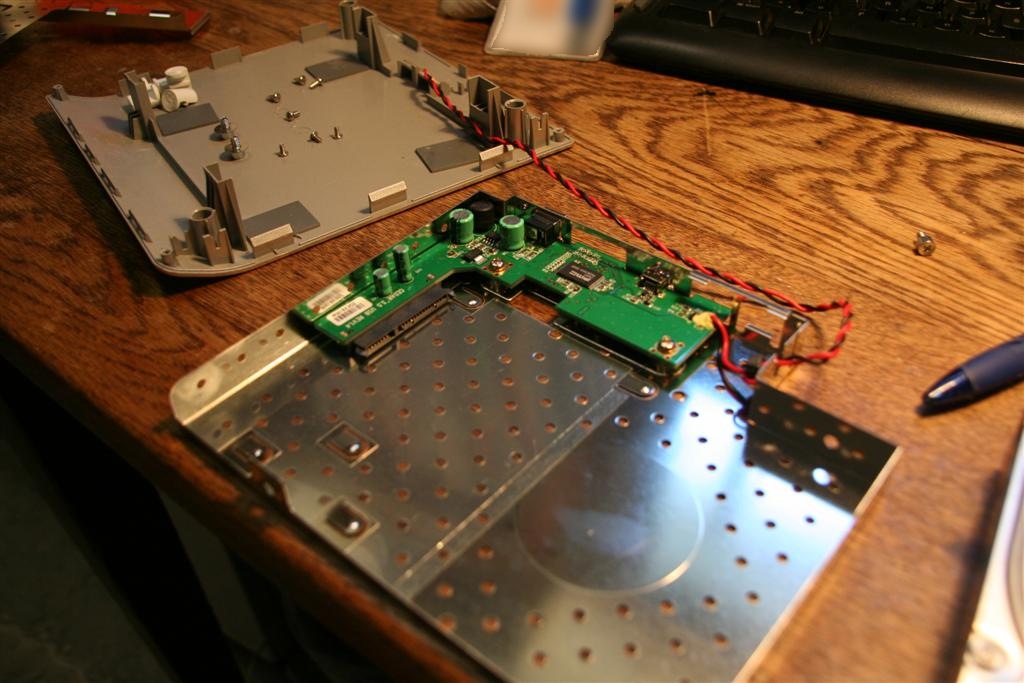
 )


 Όταν κάηκε το τροφοδοτικό από κεραυνό στο custom made desktop το πήγα απλά στο μαγαζί που μου το έφτιαξε και μου το άλλαξαν χρεώνοντας μόνο το κόστος του ανταλλακτικού. Το ίδιο ακριβώς και όταν βραχυκύκλωσε η μητρική.